Cisco has released Access Manager in Early Access. Access Manager is essentially a cloud Network Access Solution (NAC) solution for their Cisco Meraki Platform. Can this new Access Manager solution replace your on-premises Cisco ISE or other NAC solution? Well, I had the exact same questions, so I enabled it in my lab!
Licensing
Cisco haven’t unveiled their licensing model for Access Manager currently. Hopefully, it will be included with existing licensing, but either way, they are providing everyone with the opportunity to try the solution as a ‘free trial’. This provided me with a great opportunity to try it out.
Compatbility
Access Manager is hosted in the Cisco Meraki Cloud. It can only authenticate supplicants on Cisco Meraki infrastructure. In other words, you can’t use Access Manager as an authentication server for on-premises Catalyst or any non-Meraki network devices. It supports the EAP-TLS and EAP-TTLS EAP protocols. This allows devices to authenticate with a Certificate or Username and Password. Certificates are always my first preference.
IdP Integration
I was able to test integration with Microsoft Entra ID. Similar to other solutions, I created a Custom Enterprise Application in Entra, set the API permissions and supplied the Tenant ID, Secret and Secret ID within Access Manager. This only imported users though, devices aren’t imported (yet…)
Access Policies
Access Policies are the rules that allow clients to connect based on the attributes of their identity objects. Access Manager allowed me to choose from a variety of attributes to define the access. The attributes available were largely based on the below:
- Properties of the client’s certificate
- Properties of the user (such as User Groups from Entra ID)
- Properties of the device (such as manually defined device ‘client’ groups)
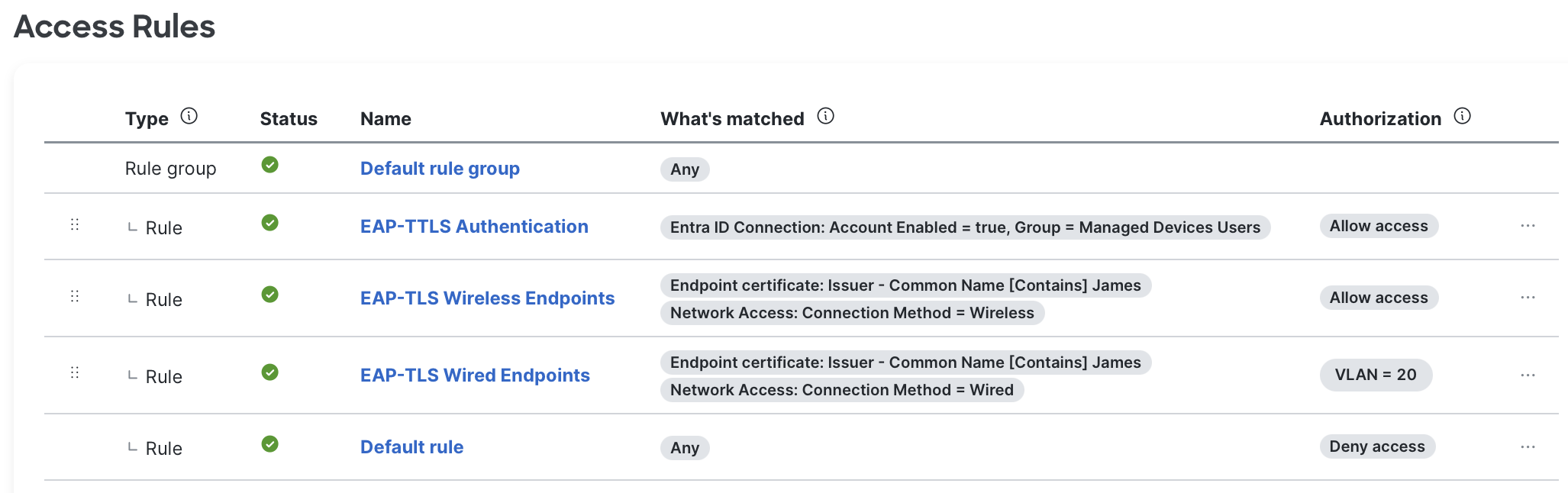
Authentication Methods
Essentially, there are two methods of authentication – EAP-TLS and EAP-TTLS. You can use either method to authenticate Wired or Wireless clients. I’ll break the remainder of the blog up into these two methods of authentication.
EAP-TLS (Certificate Authentication)
EAP-TLS is really quite simple, you just need to upload the root CA and mark it as trusted. Your devices then just need to trust the Meraki EAP certificate. Within Meraki, each network has its own EAP certificate and the organisation has its own wildcard which makes this significantly more flexible and secure. You should deploy certificates and a dot1X profile via MDM. Via MDM, clients need to be configured to trust your Meraki’s public CA certificate and your network’s CN. The Access Rules in Access Manager then allow you to apply access based on a variety of attributes.

EAP-TTLS (Username and Password Authentication)
EAP-TTLS is also really simple. As long as your users have synced across from the IdP and appear in the Dashboard, they can use their Entra ID credentials to authenticate. The inner method for EAP-TTLS in this case is PAP, which is not the default for Windows or Apple devices – so don’t expect users to ‘just connect’ without a little hand-holding. See this article from Cisco for some examples.

My Thoughts
It obviously depends on your requirements but if you’re using ISE or ClearPass, especially the endpoint profiling features, this probably can’t replace that solution for you yet. However, if you’re using Meraki Cloud Authentication/Local Auth or NPS, I’d take a serious look at Access Manager.
In my opinion, the biggest feature gap between ISE/CPPM and Access Manager at this stage is chained certificate authentication (TEAP specifically), MDM integration (for Unified Endpoint Management) and Endpoint Profiling. I think these features will undoubtedly make their way to Access Manager in the near future – after GA. On the plus side, this is by far the easiest NAC solution you’ll ever implement and will make dot1X more accessible for more organisations. Access Manager is a really cool and exciting product that I can’t wait to implement for our customers.
Leave a Reply